




As we embark on a new year, we want to remind you of the numerous branded resources that are available to you as a Kettering Health employee–all located in one place and easy to access.
Manually install Templafy for Microsoft Office (Outlook, Word, Excel, PowerPoint)
Templafy is an app that standardizes documents and email signatures with the proper branding across the system. It’s designed to provide easy access to Marketing-approved standard documents like Word templates, Outlook email signatures, PowerPoint slides, and other images/graphics available through Microsoft Office.
If you do not currently have Templafy installed on your workstation, follow the step-by-step guide below to begin taking advantage of the resources available to you.
- Go to the workstation’s Start menu and search for “Software Center.”
- When the Software Center opens, you can either scroll through the main page or type in the search bar in the top right locate Templafy.
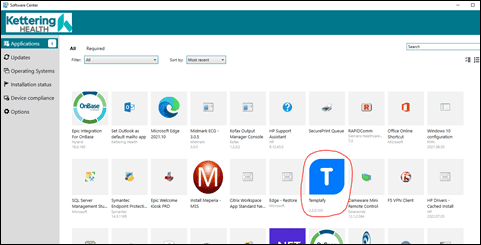
- Click on the application.
- On the application page, click “Install.”
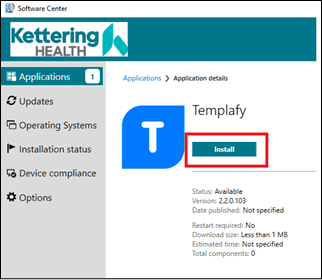
- Once the app has been installed on your workstation, the screen should look like this:
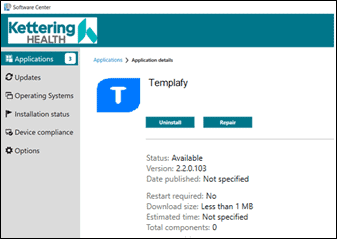
- If your screen matches the image above, it has successfully installed. You can close out of the Software Center window.
Ensure the install is working properly
- A few moments after the install finishes, you should see the following pop-up:
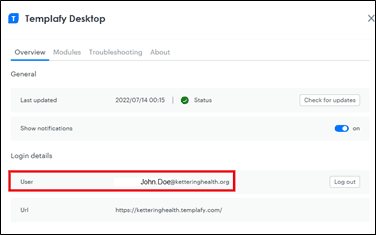
- Then, your Kettering Health email should auto-fill in the “User” line.
- If Outlook is already open on your desktop, close out of it completely and launch a new session. Once Outlook has loaded, wait about a minute for Templafy to sync with Outlook. At that point, the email signature should be updated and include the information you have saved in your Templafy profile. You should then also see the Templafy icon in the top left corner of the toolbar in Word, PowerPoint, and Excel. You can click on the icon at any time to access Kettering Health-branded documents.
*If you previously created a Templafy profile on another workstation, then you have completed the install process and Templafy should be ready to be used as you should now be logged in and connected to your profile. You can skip the next step.
**If this is your first time setting up Templafy and/or you have not created a Templafy profile in the past, please continue.
Set up a Templafy profile
- After your email fills in on the “User” line you should see the pop-up shown below.
- Click Access Templafy.
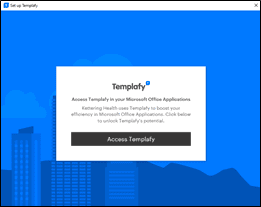
- Fill in your profile information.
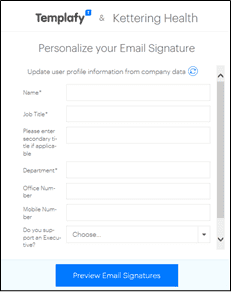
- Click Preview Email Signature.
- Close out of Outlook completely and launch a new session. Your email signature should be updated with the information you entered in the profile screen.
Easily reference all of the above steps and more information, here.
k-Direct is a simple and quick way to order the printing and marketing materials that your department uses on a regular basis.
Some of the branded items available for ordering on k-Direct include business cards, envelopes, appointment cards, note cards (thank-you, birthday, sympathy, etc.), flyers, forms, promotional items, and more.
Visit kdirect.org to order print materials today.
The Print Shop is located at Kettering Health Miamisburg and should be used for small to medium quantity print jobs. The Print Shop uses a platform called TRAC, like k-Direct, where you can view and order materials you need printed.
Some of the items the Print Shop can manage include booklets, magnets, brochures and flyers, laminated items, mailings, specialty projects, forms, and more.
Log in to TRAC and find contact information for the Print Shop here or email printshop@ketteringhealth.org.
This site contains a printable PDF version of forms that may be needed during a downtime/interruption in service. Visit this site and find the form you need by searching the name or keyword.
If you have print project needs that cannot be met by one of the above resources, reach out to the Marketing and Communications team at MarketingandCommunications@ketteringhealth.org.
Additional resources
- Uniform store: show your Kettering Health (and Bengals!) spirit with branded apparel and other promotional items. Be sure to check back frequently as new items are added regularly (like new breastfeeding scrub tops!).
- Microsoft Teams backgrounds: display a Kettering Health-branded or Bengals and Kettering Health co-branded background during all your virtual meetings by downloading the files below.